🤖 Full Automation Setup
This guide walks you through configuring Chronyx for fully automated trading - from wallet setup to hands-free buying and selling. Once complete, Chronyx will detect new tokens, buy them, and protect your positions automatically.
⚠️ Important: Automated trading involves real financial risk. Never invest more than you are willing to lose. Start with small amounts until you are confident in your configuration.
Step 1: Create a Wallet & Deposit SOL
First, you need a Chronyx wallet with SOL to trade.
- Follow the Wallet Creation guide to generate your wallet inside the bot.
- Copy your wallet address and send SOL to it from an exchange or external wallet.
- Wait for the deposit to confirm (usually within seconds on Solana).
⚠️ Important: Only send SOL to your Chronyx wallet. Do not send other tokens from exchanges directly.
Step 2: Configure Settings
Before trading, make sure your transaction settings are dialed in. Open ⚙️ Settings and configure:
- Slippage: Set to 15-25% for memecoins. Lower slippage means failed transactions on volatile tokens. Slippage is the maximum price difference you accept between placing and completing a trade.
- MEV Protection: Turn ON. This protects you from sandwich attacks (where bots manipulate your trade price).
- Priority Fee: Set to 0.00001 SOL (recommended). Higher fees get your transactions included faster.
Step 3: Set Up Stop Loss & Take Profit
Protect every position automatically. Open 🛡️ Stop Loss / Take Profit and configure:
- Stop Loss: -25% (sells everything if the token drops 25% from your buy price)
- Take Profit Steps:
- Step 1: +50% - sell 50%
- Step 2: +100% - sell 50% of remainder
- Step 3: +200% - sell 100% of remainder
- Auto SL/TP: Turn ON - this automatically activates SL/TP on every new buy.
Step 4: Enable Trailing Stop Loss
Add dynamic protection on top of your fixed SL. Open 📉 Trailing Stop Loss and set:
- Trailing %: 20% (recommended starting point)
With Trailing Stop active, if a token rises past your TP steps, the trailing stop continues protecting any remaining position and locks in profits as the price climbs.
Step 5: Configure & Enable Alpha Radar
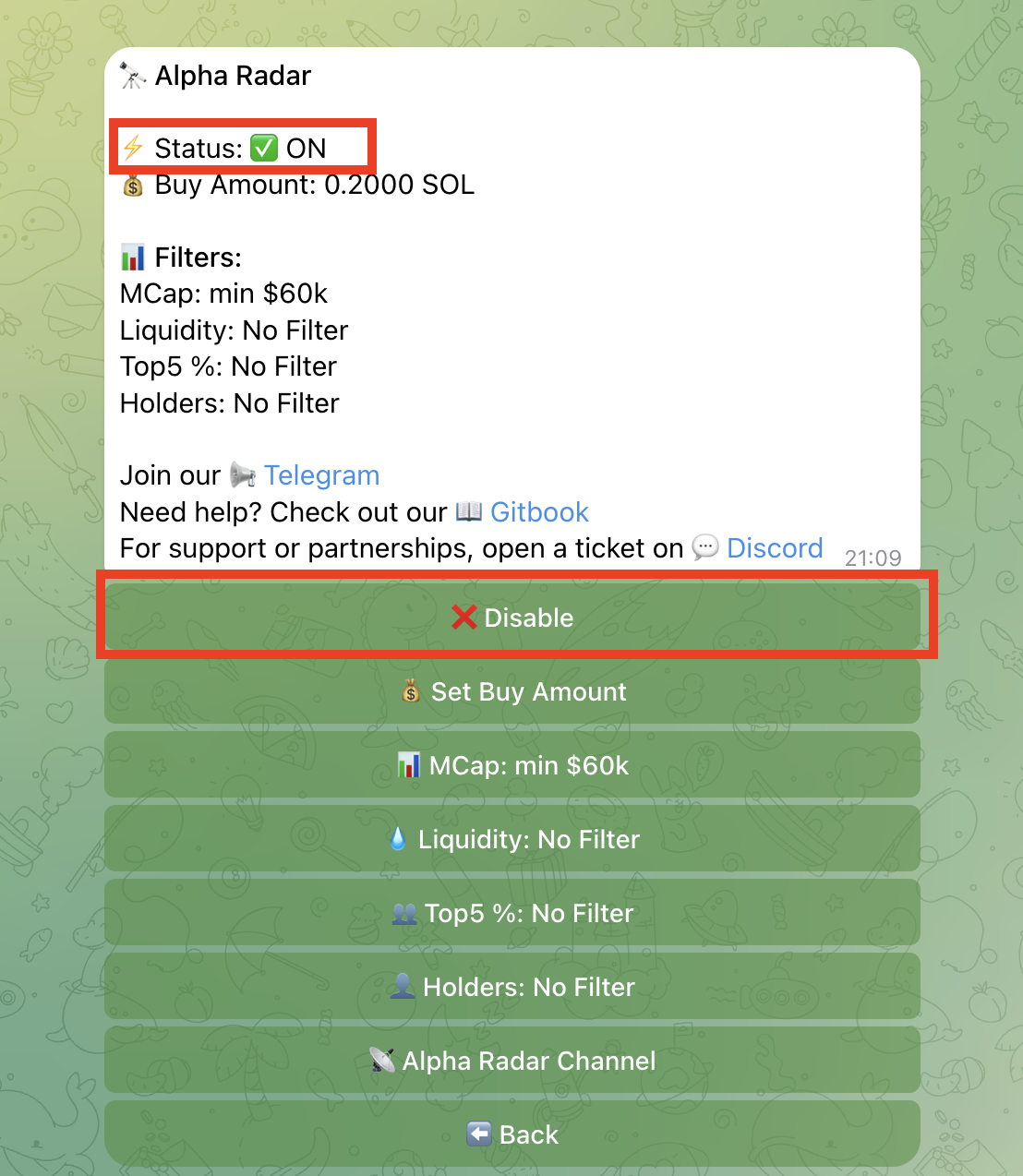
Now set up the engine that finds and buys tokens automatically. Open 🔭 Alpha Radar and configure:
- Buy Amount: Start with 0.1 SOL (adjust to your risk tolerance)
- Filters: Set your preferred market cap, liquidity, and holder filters. Recommended starting point:
- Min Market Cap: $40,000
- Min Liquidity: $10,000
- Max Top 5 Holder %: 30%
- Auto-Buy: Turn ON
- Toggle: Flip the radar to 🟢 ON
✅ What Happens Now?
With everything configured, here is the full automated flow:
- 🔭 Alpha Radar detects a new token on Solana matching your filters
- 💸 Chronyx auto-buys the token using your configured Buy Amount
- 🛡️ Stop Loss & Take Profit activate automatically (Auto SL/TP is ON)
- 📉 Trailing Stop Loss runs alongside, moving up as the price climbs
- 🎯 TP steps trigger and partial profits are taken automatically
- 💥 If the price reverses, SL or Trailing Stop exits the remaining position
You receive Telegram notifications at each step - buy confirmation, TP hits, and exit alerts.
Please note: Automated trading carries risk. Crypto markets are volatile and no strategy guarantees profit. Start with small amounts, review your settings regularly, and never invest more than you can afford to lose.